Moto G, Moto X and Moto E have several hiddensettings inside the system settings. Enable or disable Sensors, USB mass storage, In-call music, OTG mode selection, set data usage limit, data monitoring, etc. are few of them. These are system settings associated with Qualcomm processor and normally not available for general users. However, there is a trick to access these hidden settings on Moto G,Moto X and Moto E without root.
In this tutorial, we show you how to access Moto G’s hidden settings without root access. The procedure is same for Motorola’s other Moto smartphones – Moto X and Moto E. If you are really interested in exploring the newsettings, read on to know how to access thesesettings.

Before you get start exploring the new secretsettings on Moto G (also on Moto X and Moto E), keep in mind that do not alter any setting unless you know what the setting is intending for.
Warning: These are critical system settings of the device, so do at your own risk.
How to access hidden settings of Moto G, Moto X and Moto E
1. First, install a third-party launcher, such as Nova Launcher or Apex Launcher from the Play store. Once installed the launcher, long press on the home screen and from the menupopping up, select ‘Shortcuts’.
2. In the sub menu, select, ‘Activities’.
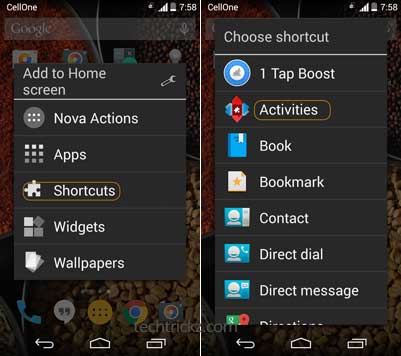
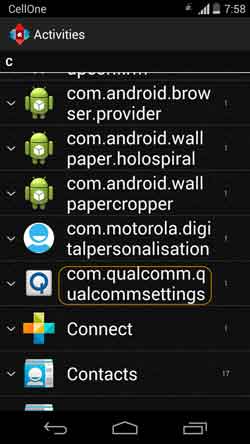
3. Now, scroll down through the list and select “com.qualcomm.qualcommsettings.” to access the hidden “Qualcomm Settings” menu. That’s it.
Note that, normally users need root access to access these kinds of settings. However, third-party launchers allow users to access internal system settings by bypassing root accesssecurity. (Source – Androidpit)


No comments:
Post a Comment